



Understanding VGA Cables and Their Applications
Step into the fascinating world of VGA cables, their various intricacies, and how they influence your everyday tech experiences.
What is a VGA Cable?
Before we plunge into the nitty-gritty of the subject, let’s start with the basics. A VGA Cable, or Video Graphics Array Cable, is a type of cable used to transmit video data from a device to a display. This could be from a computer to a monitor, a laptop to a projector, or similar setups. It’s a kind of “messenger,” if you will, carrying video data from one point to another.
History of VGA Cables
Stepping back in time, VGA cables were introduced in 1987 by IBM as a part of their PS/2 line of computers. It was initially designed to support a display resolution of 640×480 pixels—quite a feat for its time, wouldn’t you agree? But the journey didn’t stop there. VGA cables and interfaces have evolved since then, embracing more capabilities and improving over time.
The Anatomy of a VGA Cable
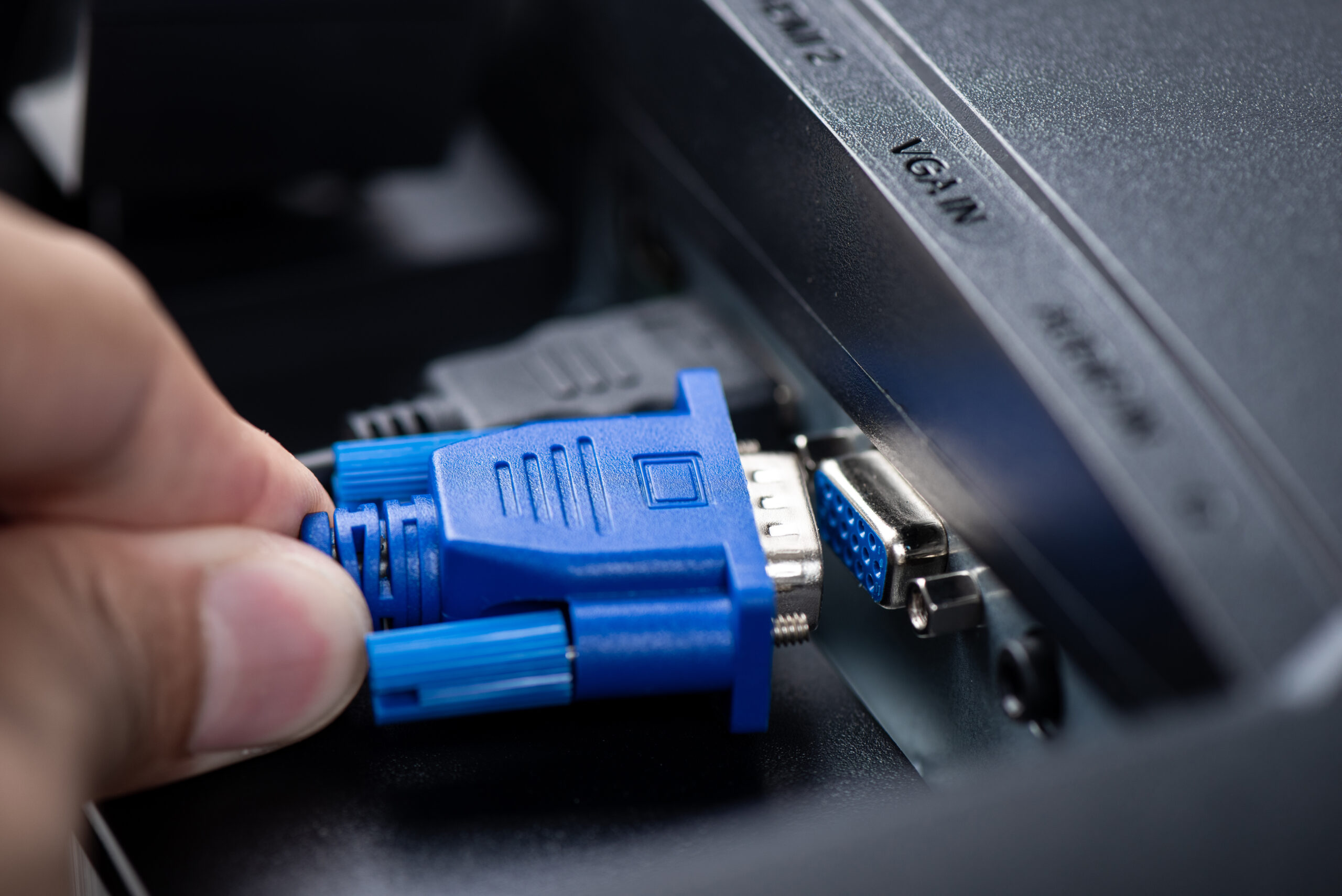
Did you ever wonder about the construction of a VGA cable, the wires and pins that make the magic happen? Well, a standard VGA cable usually comprises 15 pins arranged in three rows. Each pin plays a distinct role in transmitting color and synchronization signals to the display device.
How VGA Cables Work
Now let’s get our hands dirty with a bit of science. A VGA cable works by transmitting analog signals. It sends red, green, and blue (RGB) color signals and synchronization signals separately, ensuring that the display accurately portrays the sent data. Sound complicated? Think of it as a team, where each player has a specific role to ensure the victory—accurate and high-quality video transmission.
Types of VGA Cables
VGA cables come in various shapes and sizes, each designed for a specific purpose. For instance, standard VGA cables, slim VGA cables, and flex series VGA cables are a few types, each offering unique advantages in terms of flexibility, transmission quality, and so on.
VGA-to-Phono Cables: Bridging Video and Audio Worlds
Let’s now unravel another cable curiosity: the VGA-to-phono cable. If you’ve ever dabbled with home theater setups or older gaming consoles, you may have encountered this hybrid. But what exactly does it do, and where does it fit into the picture?
A VGA-to-phono cable acts as a bridge between devices using VGA connections for video (typically computers or projectors) and devices requiring phono (RCA) connectors, which are more common in older televisions, amplifiers, or audio gear. The “phono” term generally refers to the classic red, white, and yellow RCA connectors—red and white for audio, yellow for composite video.
Typical Uses and Scenarios
You might use a VGA-to-phono cable when you want to:
- Connect a computer with a VGA output to a television or projector that only accepts RCA input,
- Integrate older audio systems with modern computers, especially for presentations or multimedia playback,
- Link vintage gaming consoles to monitors that only feature VGA ports.
It’s worth noting that a simple cable won’t always do the trick; since VGA is analog video and RCA (phono) can carry both analog video and audio, adapters may require built-in converters to handle the signal differences. In a pinch, though, this cable is the technological handshake that helps your classic gear play nicely with your newer devices.
The SVGA-HD15 Cable Explained
One step up from standard VGA cables, the SVGA-HD15 cable is designed to deliver enhanced video clarity and performance. The “HD15” denotes the 15-pin configuration typical of VGA-style connectors, but what sets SVGA (Super Video Graphics Array) apart is its ability to support higher resolutions—making it ideal for modern visual demands.
If you’re looking for sharpness and detail when connecting your computer to a monitor or projector, the SVGA-HD15 is a solid choice. Its design focuses on reducing signal interference, ensuring that what you see on your screen is crisp and true to the source. This makes it particularly favored for business presentations, classroom settings, and anywhere a clear, vibrant image matters.
In brief, if your setup calls for higher picture quality and reliable connectivity—especially in applications like computer displays—the SVGA-HD15 cable fits the bill beautifully.
VGA Cable vs. HDMI and DVI
How does a VGA cable fare when pitted against other video transmission standards like HDMI and DVI? Well, while VGA transmits analog signals, HDMI and DVI primarily handle digital signals. Each has its pros and cons, which we’ll dissect further in this section.
VGA to DVI-D Cables: Bridging the Analog-Digital Divide
Curious about connecting a device with a VGA port to a display that only supports DVI-D? That’s where a VGA to DVI-D cable comes into play. Since VGA sends analog signals and DVI-D is all about digital transmission, this cable includes a built-in converter. Its job? To translate those old-school analog signals from your trusty desktop or laptop into crisp digital signals, suitable for newer monitors or projectors.
This cable is especially handy if you have a legacy computer or laptop that you’d like to hook up to a modern, digital-only display. It can also work in reverse—allowing some digital devices to output to an analog display, thanks to active signal conversion. Whether you’re hosting a retro movie night on your grandfather’s projector or giving an important presentation from a vintage machine, VGA to DVI-D cables help make sure your signal reaches its destination, looking its best.
Understanding VGA Connectors
Just like you need the right key to open a lock, you need the right connector for a VGA cable to function. VGA connectors are typically D-shaped and carry 15 pins for transmission. Depending on the application, they can be male or female types. Intrigued? Wait until we get into the details!
Male-to-Female VGA Cables Explained
Let’s unravel the mystery of male-to-female VGA cables—a term you’ll often come across in computer setups, classrooms, and meeting rooms. So, what’s the deal? A male-to-female VGA cable features a male connector (with pins) on one end and a female connector (with holes) on the other.
This design isn’t just for show. It allows you to extend the reach between your devices or connect multiple VGA cables together, making it especially handy when your monitor or projector is a little too far from your computer. Need to bridge the gap between devices with different port types or simply add a bit more length? The male-to-female configuration is your trusty sidekick, easily adapting to a range of setups—whether you’re connecting a desktop to a distant projector or linking additional display equipment in a conference room.
Keep in mind, while male-to-female is the foundational pairing, there’s a wide variety of specialized VGA cable types for specific functions and connection needs.
Female-to-Female VGA Cables: What Are They and When Are They Needed?
Let’s talk about a lesser-known, yet incredibly handy piece in the VGA universe—the female-to-female VGA cable. Picture this cable as a middleman, or perhaps the “bridge-builder” of the bunch. Instead of connecting directly to a device, both ends of this cable are female connectors, which means they receive rather than plug in.
So, when would you need one? The most common scenario is when you have two VGA cables with male ends that need to be joined to extend your overall reach—say, your computer is just out of arm’s length from your monitor or projector. Instead of buying a longer cable, you can simply use a female-to-female VGA coupler to join your existing cables together. It’s all about flexibility and keeping your workstation tidy without the need to snake a fresh cable around the room.
In short, while not an everyday necessity, female-to-female VGA cables come to the rescue when extension and adaptability are key.
What is an SVGA Cable and How Is It Different from a Standard VGA Cable?
While VGA cables may be the classic workhorses in the world of video transmission, SVGA cables are like their more ambitious, high-achieving cousins. SVGA stands for Super Video Graphics Array, designed to support higher resolutions and enhanced image clarity compared to the standard VGA.
So what sets SVGA apart? In essence, SVGA cables are built to handle greater bandwidth, allowing them to transmit video signals at resolutions above the traditional 640×480 pixels that VGA pioneered. For example, while standard VGA tops out quickly, SVGA can comfortably support 800×600, 1024×768, and even beyond, making it a better choice for sharper graphics and larger displays.
Despite these improvements, SVGA cables maintain backward compatibility. In other words, you can plug an SVGA cable into your old VGA devices, and they’ll happily work together—no drama involved. However, both types remain analog at heart, transmitting signals that can be converted to digital with the appropriate adapters or interfaces. So, if you’re looking to up your visual game without leaving legacy devices in the dust, SVGA cables are the “evolved” option that bridges the past with better picture quality.
The Importance of VGA Cables in Video Transmission
VGA cables are not just a piece of hardware; they are the backbone of video data transmission in many setups. From your office presentations to the gaming marathon at home, VGA cables have a significant role to play. Why so? Let’s find out.
Understanding VGA Cables and Their Applications in Different Industries
VGA cables are ubiquitous, finding applications in various industries such as education, corporate, entertainment, and more. Whether it’s powering a high-definition movie in a theater or enabling a crisp presentation in a boardroom, VGA cables are there, working behind the scenes.
Male-to-Male VGA Cables: What Are They Used For?
Now, let’s shine the spotlight on the male-to-male VGA cable. Picture this: on each end of the cable, you’ll find a connector with pins—both “male” in cable-speak. This type of cable is designed to link two devices, such as connecting your computer’s VGA output directly to a monitor or a projector’s VGA input. Simple, right?
Where do male-to-male VGA cables fit in your tech toolkit?
- Direct Video Connections: Perfect for linking PCs, laptops, or media players to VGA-equipped screens, monitors, or projectors in offices, classrooms, or home setups.
- Signal Integrity: Because there are no converters or adapters in the middle, these cables generally offer stronger, clearer video signal transmission—fewer potential points for signal loss.
- Plug-and-Play Simplicity: No fuss, no adapters—just connect each end and you’re ready to display.
Of course, if your devices both have VGA ports, this is the cable you’ll reach for. If not, you may need an adapter, but direct connections remain the gold standard for maintaining signal quality.
Connecting Devices: The Role of USB-to-VGA Adapters
Let’s talk modern solutions—enter USB-to-VGA adapters. As today’s laptops and ultrabooks slim down on traditional ports, these adapters have become a handy bridge between newer devices and classic VGA displays. But how do they actually work?
At their core, USB-to-VGA adapters convert the digital signal from a USB port (often USB-A or USB-C) into the analog signal a VGA monitor expects. This is particularly useful for connecting lightweight laptops, tablets, or even certain desktops—devices that may lack a built-in VGA output—to external monitors, older projectors, or legacy equipment.
You simply plug one end of the adapter into your device’s USB port, and the other end connects to your display’s VGA input. Some newer adapters harness USB-C’s DisplayPort Alternate Mode (DP Alt Mode), which allows for seamless video output, given your device and display both support this feature.
What makes these adapters especially valuable is their flexibility:
- Expanding workspace: Use an old monitor as a second screen for productivity.
- Legacy equipment compatibility: Hook up modern computers to projectors in conference rooms or classrooms.
- Travel-ready presentations: Present anywhere with just your laptop and a compact adapter.
In short, USB-to-VGA adapters provide an elegant way to keep yesterday’s reliable displays in action with today’s ever-changing tech.
The Lifespan of VGA Cables
Ever wondered how long your VGA cable will last? This section will shed light on the lifespan of VGA cables and factors that may influence it.
Maintaining Your VGA Cables
To ensure your VGA cable serves you well for a long time, proper maintenance is key. We’ll explore some useful tips and tricks to keep your VGA cables in tip-top shape.
The Future of VGA Cables
Is the VGA cable destined to become a relic of the past, or does it still hold a place in the future of video transmission? We’ll look into where the industry is headed and how VGA fits into it.
Common Problems with VGA Cables and How to Solve Them
Despite their robustness, VGA cables can encounter issues. We’ll discuss common problems you might face with VGA cables and offer easy-to-follow solutions.
Understanding VGA Signal Quality
The quality of the VGA signal greatly impacts the final video output. We’ll delve into how VGA cables influence signal quality and ways to ensure optimal performance.
How to Choose the Right VGA Cable
With so many types and varieties of VGA cables in the market, choosing the right one might seem daunting. Fear not, for this section will guide you on how to pick the perfect VGA cable for your needs.
Understanding VGA Cables: Frequently Asked Questions
Got questions about VGA cables? We’ve got you covered. This section answers common queries related to VGA cables and their applications.
Conclusion
In the end, we’ll wrap up our journey of understanding VGA cables and their applications, summarizing the key points covered in the article.
Understanding VGA Cables: Frequently Asked Questions
What are the main applications of VGA cables? VGA cables are primarily used to transmit video data from a computing device to a display device. They find widespread use in computer monitors, projectors, televisions, and other display systems.
Why are there 15 pins in a VGA cable? Each of the 15 pins in a VGA cable has a specific function in transmitting color and synchronization signals to the display device. They work together to ensure accurate and high-quality video transmission.
Can a VGA cable transmit audio? No, VGA cables are designed only for video transmission. To transmit audio, you’d need a separate cable, such as an audio jack or HDMI cable that can carry both audio and video signals.
What’s the difference between VGA and HDMI? While VGA transmits analog signals, HDMI carries digital signals, enabling both audio and video transmission through the same cable. HDMI can also support higher resolution and better quality compared to VGA.
Are VGA cables becoming obsolete? While newer technologies like HDMI and DisplayPort are becoming more common, VGA still holds a significant place, especially in legacy systems and certain industries that prefer analog signals.
How do I choose the right VGA cable? Consider factors like your device compatibility, required length, flexibility, and quality of the cable. You should also ensure that the VGA cable supports the resolution of your display device for optimal performance.
Conclusion
Understanding VGA cables and their applications helps us appreciate the role these unassuming pieces of hardware play in our everyday tech experiences. Whether you’re a tech enthusiast, an IT professional, or just a curious learner, knowing about VGA cables can enrich your understanding of video data transmission. Keep exploring, and don’t stop learning!